Building Multiplayer Open-World Web Games That Run Everywhere

Web-based games have historically been viewed by both players and developers as limited, casual experiences, primarily due to perceived hardware and software constraints inherent to browser environments.
Indeed, web games must adhere to several practical constraints: ensuring smooth performance even on slower mobile devices and achieving rapid loading times, ideally within just a few seconds. Despite these real challenges, the belief that web games must remain small in scope and simplicity doesn’t hold up.
Historically, constraints have often driven developers to greater creativity, prompting them to find innovative ways to bring their ambitious visions to life despite technological limitations. Today’s web games face similar hurdles, but with thoughtful design, advanced technology, and creative solutions, it’s entirely possible to develop rich and immersive multiplayer worlds that move beyond casual experiences.

Web-based games represent valuable opportunities due to their instant accessibility, eliminating lengthy downloads and installations. Their inherent cross-platform compatibility enables developers to reach wide audiences seamlessly across various devices and operating systems.

At Elanra Studios, we embrace these limitations to deliver ambitious, engaging games. Some of our past web games:
- SimplyUp.io
- ColorUp
- Simply Prop Hunt
- SimplyHoppers.io
- Cannon Clash
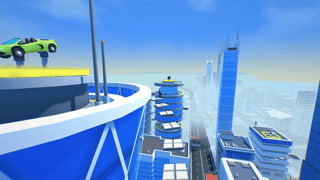
In this article, we’ll dive into how we designed and built Simply City, an upcoming game on Poki featuring a large, interactive open world where over 30 players can explore, interact, work, drive vehicles, and socialize together, pushing the boundaries of web-based gaming.

Understanding Web Game Constraints
Building web-based games introduces specific technical constraints that developers must carefully manage, often presenting stricter limits compared to native / mobile applications:
- Performance Optimization: Web games typically target smooth gameplay (around 30–60 FPS) even on older or low-end mobile devices, some of which might have under 2GB of RAM or processors clocked below 1.5 GHz. In comparison, native games often comfortably utilize devices with 4GB RAM or more, optimized GPUs, and powerful processors.
- Fast Loading Times: Web games aim for load times under 5 seconds, ideally closer to 3 seconds, to retain user engagement. By contrast, players generally tolerate longer load times (up to 10–20 seconds or more, and that excludes installation time) when launching installed mobile or PC games.
- Browser Compatibility: Web games must support multiple major browsers (Chrome, Firefox, Safari, Edge), each with varying levels of HTML5/WebGL/WebGPU implementation, creating compatibility hurdles rarely faced by native mobile apps that primarily target two stable platforms (iOS and Android).
- Network Latency and Bandwidth: Web-based multiplayer games typically require stable gameplay with latency under 150ms for acceptable responsiveness. While native games also prefer sub-100ms latency, web games face the additional complexity of browser-based networking limitations, less direct network access, and reliance on web protocols like WebSockets (only TCP, no UDP protocol readily available).
- Limited Storage and Memory: Web browsers typically restrict local storage for applications (often limited to around 50–100MB), significantly less than native mobile apps that frequently exceed 500MB to several gigabytes. At the same time access to the system RAM is limited and can be throttled by the OS. This limitation demands efficient asset management, aggressive compression, and careful memory handling to minimize memory usage and prevent performance degradation or crashes.
Despite these technical limitations, strategic design and modern technologies enable developers to create increasingly sophisticated and immersive gaming experiences accessible directly through web browsers.
Developing the Technology Behind Simply City
When we began designing Simply City, a large-scale multiplayer open-world game, we knew the challenges would be significantly greater than those of our previous projects.
Our platform and web engine of choice is PlayCanvas. PlayCanvas stands out with its cloud-based editor, allowing real-time collaboration between developers, artists, and designers from anywhere. Its lightweight engine ensures optimal performance in web environments, the editor provides many assets/resources automations while it maintains an open and accessible API.
Our first step was dedicating time to refactoring our toolset, a suite of systems we’ve developed to extend and push the boundaries of what’s possible in PlayCanvas. Over the years, we refined these tools, even licensing them as middleware to other studios under the name Solar Tools SDK.

Contrary to popular belief, the biggest hurdle in building complex web games isn’t just the typical constraints of performance and browser limitations. Instead, it’s the lack of robust systems and tooling in most web game frameworks, features that native engines provide by default. Critical systems like automatic object instancing, level of detail (LOD) management, advanced visibility and culling techniques, and efficient property/component replication over the network are often missing, requiring custom solutions to bridge the gap.
Simply City: the Game World

Our goal with Simply City was to create a seamless, single-level open world that captures the energy of a bustling city while encouraging exploration and player interaction.
The game world was fully designed and assembled in Blender. Key metrics include:
- 4,500 game objects, including 280 buildings
- 1 million triangles for a balanced mix of performance and visual quality
- 1.5 x 1.5 km open-world city layout
- 11.8 km of drivable roads, featuring highways, ramps, and tunnels
- 26 unique vehicle types, all fully player-controlled
This scale and complexity bring Simply City to life, offering a rich and immersive urban experience for players.

Now, let’s explore the challenges of bringing this expansive game world into a web browser while ensuring an engaging yet lightweight gaming experience.
Challenge 1: Game Level Loading
The standard approach for assembling a game world in PlayCanvas involves exporting the environment as a GLB file and importing it into the editor. This process automatically generates entities and assigns render components (models) to each object. While this method generally works, it presented several challenges for Simply City:
- High Initialization Costs: Creating and initializing thousands of entities and components at runtime significantly impacts loading time, runtime performance, and memory usage. This overhead is especially problematic on lower-end mobile devices with limited CPU power.
- Inefficient Processing: Once entities are created, further optimizing them via PlayCanvas’ built-in batching system or our custom automatic hardware instancing (which we developed to improve performance — more on this later) adds additional processing and loading time. Since most objects in the city are static, spawning thousands of entities just to pass them into these systems was inefficient. Even disabling or destroying them later introduced unnecessary processing overhead.
- Blender to PlayCanvas Workflow Limitations: Since our level design and assembly take place entirely in Blender, we wanted to avoid the friction of manually exporting and updating large GLB files in PlayCanvas. Using GLB imports for templates also increased the risk of overwriting changes when updates were made to the original assets, disrupting the workflow.

To overcome these challenges, we needed a more efficient solution for integrating our game world into PlayCanvas without excessive overhead or workflow inefficiencies.
Instead of relying on standard GLB imports for the entire level, we implemented a more efficient, modular approach that significantly improved loading performance and workflow efficiency:
1. Singleton GLB File — We exported a collection of unique game objects in an individual “singleton” GLB file. This file contains just one instance of every object used in the game, without any hierarchy or additional metadata. We split our objects to two GLB files, essentials (roads, platforms, vehicles) and buildings.

2. Preprocessing in PlayCanvas: These singleton GLBs were imported into PlayCanvas and prepared with their required components, including materials, scripts, sounds, and other game logic.
3. Compact JSON Level Data: We created a custom Python script in Blender to export the entire level hierarchy as a few compact JSON files. Each entry in the JSON contains: Object Type, Position, Rotation, Scale.

The compressed JSON files for the entire level total just 30KB, minimizing download size.
4. Web Worker-Based Level Loader: A custom PlayCanvas level loader script runs in a Web Worker (non-blocking), processing the JSON files and organizing the objects into spatial cells for efficient rendering. Objects required for gameplay are cloned as regular entities from the singleton entities (prepared in Step 2), while others are directly forwarded for batching and instancing as typed buffers (static arrays filled with position, rotation and scale for each object).
This way we fully solved the issues we faced above:
✅ The initial download size of the game, to the first frame rendered, is only 4MB.
✅ Super-Fast Loading & Minimal Processing Overhead: The Web Worker processes and transfers all buffers as Transferrable Objects, reducing memory allocation and garbage collection. Even on lower-end devices, loading remains smooth.
✅ Instant Level Editing & Playtesting: Exporting JSON files from Blender is instantaneous, and importing them into PlayCanvas takes just seconds. Future improvements using the PlayCanvas REST API could allow automated updates each time the level is modified, potentially even enabling hot updates without reloading the PlayCanvas launch window.
✅ Fine-Tuned Control Over Loading: In Simply City, we prioritize essential objects (e.g., roads, ramps, trigger zones) during initial loading. Buildings and props are loaded in a secondary JSON file to reduce initial load time and improve conversion to play (C2P).

This solution fully addressed the challenges we faced, ensuring Simply City runs smoothly while maintaining a flexible and efficient development workflow.
Challenge 2: Game Performance
Rendering thousands of objects on screen is a challenge that all games, native or web-based, must optimize for. However, web games face even stricter performance constraints due to the lower-end hardware they often need to support and the inherent limitations of APIs like WebGL, where excessive draw calls can quickly degrade performance. Optimizing for these factors is essential to ensure smooth gameplay across a wide range of devices, particularly mobile and low-power systems.
Like most web game engines, PlayCanvas includes built-in performance optimizations such as camera-based frustum culling and object batching. While these methods work well in smaller scenes, they were not enough for a large-scale game world like Simply City. The main challenges we faced were:
- A large number of draw calls due to the variety of objects rendered both up close and at a distance.
- A high polygon count that required careful management to maintain good performance.
- Frustum culling on thousands of objects added a CPU load that hurt performance rather than improving it. Also it doesn’t handle distant object visibility.
- Batching so many objects and polygons required several seconds of processing time. On low to mid-range mobile phones, this time could double or even triple. At the same time, aggressive batching significantly increased video memory (VRAM) usage, putting more strain on devices.
To overcome these limitations, we had to use our own custom solutions to keep the game running smoothly while maintaining a high level of detail.

For Simply City, we refined and improved several parts of the Solar Tools SDK, creating a system that includes:
- Automatic Hardware Instancing (v2) that scans the object hierarchy at runtime and groups models to minimize draw calls automatically.
- Per-Object Spatial Settings that allow level designers to control object visibility based on distance from the camera. This includes advanced options like different settings for each level of detail (LOD), separate rules per layer and shadows, adjustable update frequency (since most objects do not need per-frame updates), and customizable cell sizes for grouped objects.

This feature is significant because it allows the creation of large-scale levels containing thousands of objects, while rendering only a small number of them, specifically, those visible to the player. The system provides precise per-object control, so large landmarks that are visible from a distance can be set to render from farther away.

- Enhanced PlayCanvas Batching that integrates with the Object Spatial system, ensuring that generated batches follow the same optimized visibility rules. This is a huge advantaged since regular PlayCanvas batching is very useful in games with this art style (shared material/texture atlas).
For example, in Simply City, we used regular batching instead of hardware instancing for all road pieces. There are 24 different types of roads (straight single lane, straight double lane, turns, ramps, tunnels, etc.), but they all use the same material. With hardware instancing, we would have had a minimum of 24 draw calls, since each road piece uses a different model. However, with batching, we were able to group everything into a single draw call per group.

And with Spatial-enabled batching, we only render a few of those groups around the player, usually 5 to 8 draw calls at most.
Of course, it’s not possible to use the same logic for more complex geometry like building models. Even though they use the same material and the draw call savings would be significant, batching requires generation time to group the polygon clusters together. Given their higher polycount, that generation time, especially on mobile, can be considerable (2–3 seconds added).

- Optimized Network, Sound, Animation, and UI systems that work with Object Spatial settings. Level designers can control when and how these components activate around the player, reducing unnecessary processing and improving performance.

With these optimizations, Simply City runs smoothly even on low-end devices while maintaining good visual quality. Here are some average runtime performance metrics when using the lowest graphics settings on a budget mobile device:
- 100 to 130 draw calls per frame, 20-30 of those draw calls are dedicated to the UI.
- 170,000 to 200,000 polygons rendered on screen.
- No CPU or GPU spikes, as heavy calculations are either offloaded to a web worker or spread across multiple frames.
- 50MB of VRAM usage, well below the limits of any mobile operating system.
To ensure the best performance for each player, the game automatically selects the appropriate graphics preset based on the runtime performance observed in the first few seconds of gameplay.
Challenge 3: Bringing it all together
Delivering a web game under these constraints requires everything to work seamlessly across multiple systems. It is a delicate process where loading, processing, and execution must be carefully managed, either sequentially or in parallel. Optimizing every part of the game is crucial, and this demands constant play-testing, monitoring, and performance analysis to identify and eliminate bottlenecks.

We were fortunate to use Poki’s playtesting feature, which extended our internal QA process by incorporating real players into our testing pipeline. This provided valuable insights that helped us refine Simply City further. You can learn more about Poki Play Testing here.

To wrap up this article, below is a non-exhaustive list of additional optimizations, performance improvements, and strategies we implemented in Simply City:
- Asset Compression Optimization: We extensively used Basis and Draco compression to reduce download size and optimize VRAM allocation. PlayCanvas makes it easy to enable these compression techniques on a per-asset basis, ensuring efficient memory usage without compromising visual quality.
- Material and Texture Optimization: Most objects in the game share the same material and a diffuse texture atlas, reducing shader compilation time, texture loading, and memory usage.
- Optimized Asset Loading Strategy: Assets are carefully categorized into preloaded assets (loaded during initial game startup) and asynchronous assets (loaded after the first frame and at a controlled delay). This strategy reduces initial load time, improving conversion to play (C2P) while ensuring smooth performance.
- Animation System Optimization: We’ve patched the PlayCanvas animation component system to integrate our Object Spatial system (animation LODs), allowing us to dynamically adjust the animation frame rate per skinned model based on its distance from the camera. This significantly reduces CPU usage, especially on low-end devices, by lowering animation processing overhead for distant objects.

- Real-time Shadows Optimization: We used the PlayCanvas shadow renderer properties to control how often directional cascaded shadows update (shadows are enabled on Medium and higher quality presets). The farther an object is from the camera, the lower its update interval. This significantly reduces the number of draw calls needed for shadow rendering, improving overall performance.
- Terrain Shader Optimization: The terrain surrounding the city uses a custom material shader that smoothly blends between two texture channels (grass and sand), creating a more natural and visually appealing landscape.

- UI Optimization: All UI graphics are packed into sprite sheets to minimize the number of network requests needed for loading. We used the Texture Packer application to generate these sheets and imported them as a JSON file, which integrates seamlessly with the PlayCanvas Sprite editor for easy implementation.

Want to learn how to build similar games?
Last year, I taught two live classes on this topic. The recorded sessions and all course resources are now available for purchase at the following links:

Conclusion
Developing Simply City as a large-scale multiplayer web game came with many technical challenges, from managing loading times and rendering performance to ensuring smooth gameplay across different devices.
By extending PlayCanvas with custom tools, we implemented solutions such as hardware instancing, spatial visibility, optimized asset streaming, and adaptive animation and shadow updates to improve efficiency. These optimizations helped balance performance with visual quality while keeping the game lightweight and accessible.
With the game now approaching release on Poki, we look forward to seeing players explore the city and experience the world we have built!